
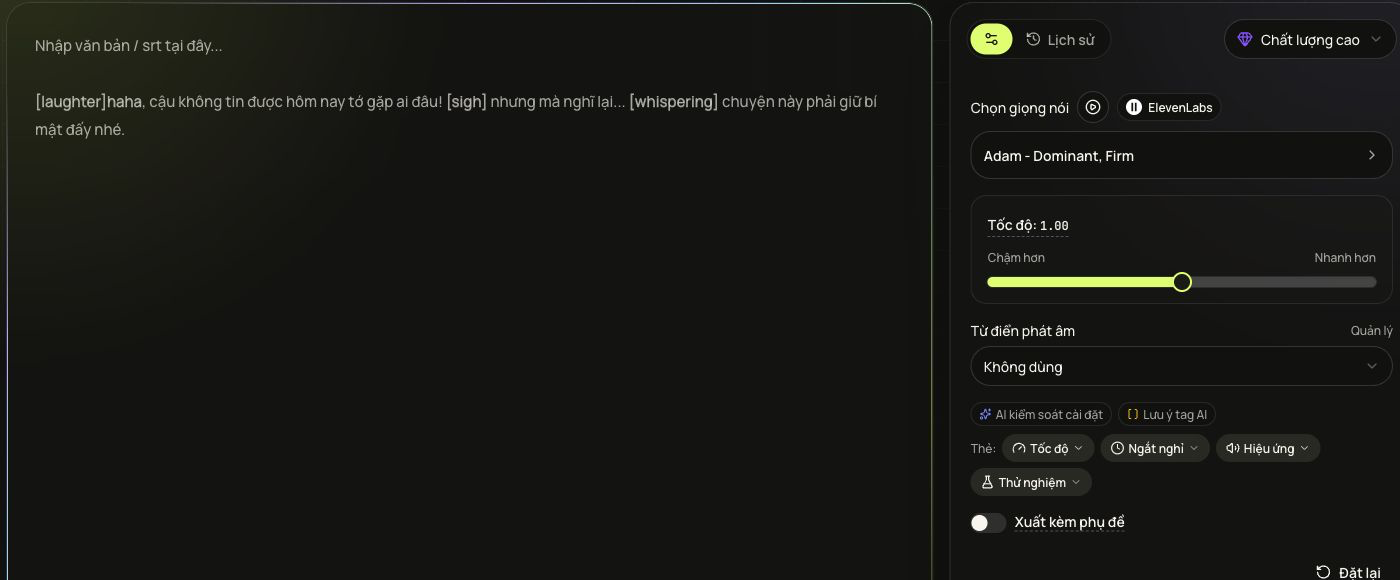
Step 1 · Manuscript
Clean the text before you choose a voice
Most audiobook fixes are cheaper in the manuscript than in the audio. Work through these items once per book.
- Punctuate long sentences
With High quality voice sources, a run of more than about 300 characters with no period, comma, semicolon, colon, question mark, exclamation mark, long dash (— or –) or bracket is rejected before credits are deducted, and the error quotes the passage. Microsoft Edge voices skip this check, but punctuation still shapes the phrasing.
- Separate paragraphs with a blank line
A single line break is read as a space. With High quality voices, a blank line between paragraphs becomes a short pause. Where a pause must have an exact length, use <break time="1s"/> on either tier.
- Check symbols and square brackets
Each asterisk (*) becomes a 0.5-second pause, so a *** scene break gives 1.5 seconds of silence. Text in square brackets is treated as a tag: valid expression tags control delivery on High quality voices, and everything else—footnote markers such as [1] included—is removed. Use parentheses for asides that must be read.
- Decide how numbers and abbreviations should sound
Write units, abbreviations and numerals the way the narrator should say them, or record each decision once as a pronunciation rule—for example, “TP.HCM” to “Thành phố Hồ Chí Minh”—so it applies to every chapter.
Step 2 · Pronunciation
Lock names and loanwords in one dictionary
A pronunciation dictionary rewrites the text sent to the voice at generation time; the manuscript in your editor stays as written. Credits are calculated on the rewritten text.
- One dictionary per book or series
Each dictionary holds up to 500 rules. A rule maps text as written (up to 200 characters) to text as it should be spoken (up to 500 characters).
- Prefer whole-word matching
Whole-word rules recognize Vietnamese letters with diacritics, so a rule for “Hà” does not fire inside “Hành”. Contains rules replace every occurrence, including inside longer words.
- Use case sensitivity for names that are also words
Rules ignore case by default. Turn on case sensitivity when a proper name is also an ordinary word, so the lowercase word is left alone.
- Remember that longer rules run first
Rules apply from the longest source text to the shortest, so a full name is replaced before a shorter rule for part of it.
- Test, then reuse
Type a sample into the dictionary’s preview box to see the rewritten text as you edit rules, then select the same dictionary in every Text to Speech or Text to Dialogue task for the book.
Step 3 · Voice and pacing
Choose the accent first, then hold the pace steady
Settle voice and pacing before the full run: changing either later means regenerating every chapter.
- Pick the regional accent before the voice
In the High quality tier, the Vbee library can be filtered by Vietnamese region—Northern, Central or Southern—plus gender, age and categories such as Audiobook and Storytelling. The Low cost tier has two Vietnamese Microsoft Edge voices: vi-VN-HoaiMyNeural (female) and vi-VN-NamMinhNeural (male).
- Set one speed for the whole book
Speed runs from 0.5 to 1.5 and applies to the whole task. Reuse the same value for every chapter so pacing does not shift between files.
- Place pauses deliberately
<break time="1.5s"/> inserts exact silence of up to six seconds on both tiers. High quality voices also accept [pause] and [long_pause] tags.
- Give dialogue its own voices
For dialogue-heavy chapters, Text to Dialogue assigns a voice and speed to each labeled speaker (A> to Z>) and adds a 0–5 second gap between lines.
Step 4 · QA
Pilot one chapter, then check every file the same way
Catch problems on one representative chapter first, before the whole book is queued and its credits are spent.
- Pilot a representative chapter
Choose a chapter with names, numbers, dialogue and loanwords. Fix the manuscript or dictionary, regenerate, and only then queue the rest.
- Import one file per chapter
A ZIP archive or folder of .txt files creates one task per chapter, submitted in order, so a later fix means regenerating one chapter rather than the whole book. A single task can still hold up to 1,000,000 characters.
- Export a transcript for proofreading
Export transcript produces SRT and JSON files from the finished audio with speech-to-text, for 15% more credits. Comparing it with the manuscript highlights passages worth re-listening.
- Fix at the source and regenerate
Change the text, a dictionary rule or a tag, then regenerate the affected chapter instead of patching the audio by hand.
Checklist controls were checked against the OpenSpeaker application and backend source code on 9 November 2026, including the punctuation check, pause syntax, pronunciation-dictionary matching and the Vietnamese voice filters. Voice libraries can change; listen to a sample before producing a full book.
Frequently asked questions
What to know before generating
Which Vietnamese voices can I use for an audiobook?
The Low cost tier includes two Vietnamese Microsoft Edge voices, vi-VN-HoaiMyNeural (female) and vi-VN-NamMinhNeural (male). The High quality tier adds connected voice-source libraries, including Vbee, which can be filtered by Northern, Central or Southern accent and by categories such as Audiobook and Storytelling.
How do I fix a word the voice keeps mispronouncing?
Add a pronunciation dictionary rule that maps the written form to a spelling the voice reads correctly. Use whole-word matching, and turn on case sensitivity if the word also appears as an ordinary lowercase word. One dictionary holds up to 500 rules.
Why was my text rejected for missing punctuation?
High quality voice sources reject a run of more than about 300 characters without a sentence or clause break, before any credits are deducted. The error quotes the passage; add punctuation and submit again. Single line breaks do not count as breaks.
Can a whole book go into one task?
Yes, up to 1,000,000 characters per task. Alternatively, import one .txt file per chapter as a ZIP archive or folder: each chapter becomes its own task, which makes regenerating a single chapter simpler.
Does the pronunciation dictionary change my manuscript?
No. Rules rewrite the text sent to the voice at generation time; the text in your editor stays as written. Credits are calculated on the rewritten text.