
Why multiple models
Image generation is not a one-model problem
Different image models make different tradeoffs in prompt following, text rendering, visual style, reference fidelity, speed, resolution and cost. OpenSpeaker keeps the selection in one interface so you can change engines without rebuilding the workflow.
Use GPT Image for strong instruction following and editing, Nano Banana for flexible multi-image work, Seedream for high-resolution options, Krea for creativity controls, FLUX or Runway for reference-led iteration, and other models when their layout or style better fits the brief.
- Text-to-image across all active families
- Reference-image editing on supported models
- Many landscape, square and portrait ratios
- Dynamic credit estimate before generation
Reference workflow
Create from a prompt or transform existing visuals
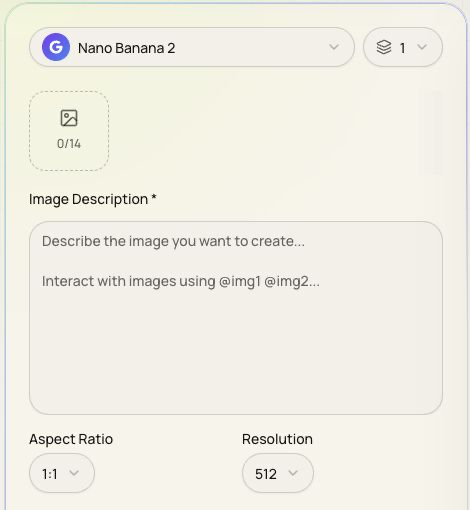
Supported models accept JPEG, PNG or WebP reference files up to 5 MB each. Some workflows accept as many as 14 reference images; the exact limit is displayed by the selected model.
References can guide composition, subject identity, product appearance or style. They do not remove the need to review rights and permission for uploaded material.
Production controls
Choose quality, resolution and variation deliberately
Depending on the model, the workspace exposes resolution, quality, creativity, negative prompt and prompt-enhancement controls. Up to four images can be requested in one task.
Start with one image and a representative reference set. Increase quality or resolution only after the composition works; this keeps iteration faster and avoids spending credits on a direction you will discard.
Model inventory and product limits were verified against the application and backend configuration on 11 July 2026. Preview models, controls and availability can change.
Frequently asked questions
What to know before generating images
How many AI image models are available?
OpenSpeaker currently exposes 20 active image models across nine provider families.
Can I edit an existing image?
Yes. Most active models support reference-image workflows, while exact asset limits and editing behavior depend on the selected model.
Can OpenSpeaker generate 4K images?
Selected GPT Image, Nano Banana and Seedream configurations support output up to 4K.
How many images can one task generate?
The active image workflow accepts one to four generations per task.
Does every model cost the same number of credits?
No. Credits vary by model, generation count, resolution, quality and reference inputs. The application calculates an estimate before generation.